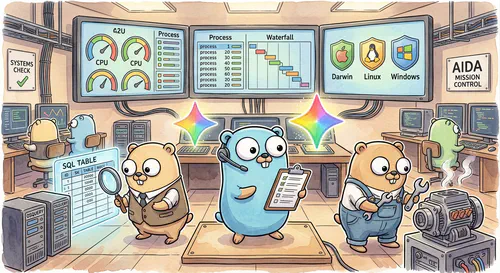

In the previous article, we rebuilt the backend of AIDA, the AI Diagnostic Agent, replacing her legacy Python and SQLite RAG setup with a compiled Genkit Go binary and on-demand Agent Skills.
With the backend done, our attention shifts to the frontend. Even with a new Go brain and on-demand skills, AIDA is still pretty much a chatbot: you type a prompt, she runs osquery, and she dumps a wall of text back at you. Even though AIDA is retro-themed, we don’t need to limit her to such a dated experience.
Modern agentic UIs should not only leverage richer UI elements, but they should also adapt to user needs instead of applying a static, one-size-fits-all approach.
In this article, we modernize AIDA’s interface. Before digging into the code, let’s look at what a modern agentic UI needs and how the Agent to User Interface (A2UI) protocol works.
What is A2UI?#
A2UI is an open protocol from Google that gives AI agents a way to speak directly in native UI components. Instead of limiting responses to text, an agent can dynamically assemble dashboards, charts, tables, and interactive controls tailored to whatever task you are working on right now.
Your frontend keeps full control over UI styling and rendering, while the agent chooses what to display based on the chat context and data.
An A2UI integration revolves around three main concepts:
- Catalog: The shared menu of UI building blocks (like panels, gauges, charts, tables, and buttons) and their schemas. Both the backend agent and the frontend client agree on the catalog upfront — you can use the built-in basic catalog or define custom components tailored to your domain.
- Surfaces: The live UI canvas (
<a2ui-surface>) rendered in the client. As the agent works, it streams structured JSON messages (application/a2ui+json) telling the client which catalog components to place on a surface and how to update their properties in real time. - Actions: Two-way events sent from a surface back to the agent when a user interacts with a component — like clicking a button, selecting a row in a table, or inspecting a node in a graph. Actions turn clicks directly into the next turn of the conversation without needing to type a follow-up prompt.
AIDA’s new frontend spec#
We want to move from a hardcoded UI to something that the agent can freely define depending on context, by using A2UI. This requires that we define a catalog of components for AIDA and give her access to these building blocks. We also need to rewire the frontend so it can render the A2UI surfaces properly.
Here is the new diagnostic cockpit in action. On the fly, AIDA assembles a 3D process graph, heads-up display (HUD) gauges, and a live osquery process table:
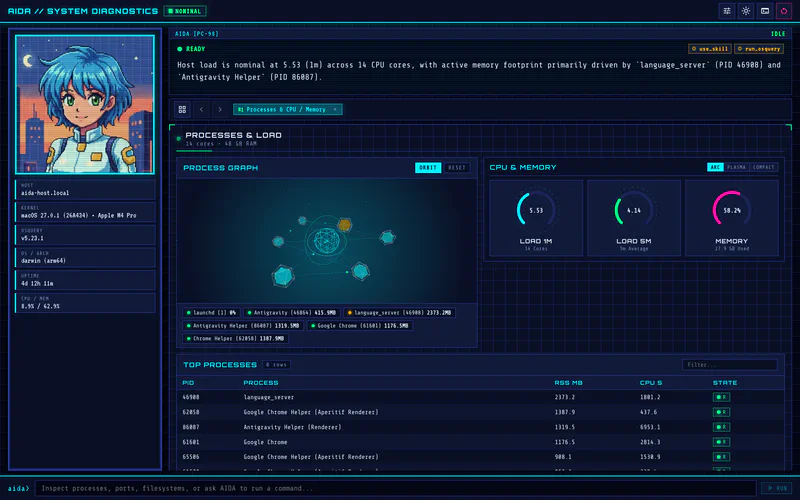
The prompt below roughly translates this intent to a specification:
Upgrade AIDA's web interface from a static chat UI to a generative diagnostic cockpit using A2UI and Genkit.

Requirements:
1. Keep the retro NEC PC-98 cyberpunk look and feel (AIDA's pixel avatar, CRT scanlines, and neon palette), with a fixed host-status sidebar showing live osquery system vitals.
2. Replace the plain Markdown chat output with an A2UI surface powered by a custom "aida" component catalog for system diagnostics: HUD panels, gauges, charts, filterable data tables, 3D system visualisations, text blocks, and action buttons.
3. Wire up two-way A2UI actions so clicking a table row, 3D node, or button sends a follow-up diagnostic action back to AIDA.
4. Add a human-in-the-loop shell command tool so AIDA can actually fix issues she finds on the host, pausing for explicit Approve/Deny confirmation in the UI before executing any command.
/grill-me
Don’t expect to one-shot this with this prompt alone. In fact, it’s important to give your coding agent the right skills, MCPs and tools for the job, as we’re going to see in the “Recommended skills” section below.
You may also notice the /grill-me skill hint at the end of the prompt. This skill comes bundled with Antigravity (and most modern coding agents), and activating it instructs the agent to ask you questions wherever instructions are ambiguous or lacking detail. This helps refine your vision and takes the pressure off having to write a flawless prompt from scratch.
Because the prompt above is very lean, /grill-me is doing a lot of the heavy lifting. This is why we can get away without fully specifying the component catalog (as we are going to see below): Antigravity will ask us for the missing details to fill the prompt gaps.
Recommended skills#
Since we’re working with Genkit, I recommend you install and activate the official Genkit Skills including developing-genkit-go and developing-genkit-js. These skills contain not only the knowledge of how to build agents and flows, but also how to work with the A2UI elements both on the client and on the server side.
In addition to those, the gemini-api-dev skill helps the agent to use modern models instead of falling back to outdated ones. This skill can be either installed as a single skill from the Google Skills repo or as part of the Gemini Cloud Developer Plugin.
A2UI catalog design#
Typical frontend development involves designing the user interface around the user journeys we want to satisfy. This is no different in A2UI applications, but we won’t be designing classic hardcoded application screens. Instead, we will be focusing on designing the individual components required to achieve our objectives.
These components are what make the agent’s catalog and they will give the agent flexibility to adapt the UI on demand. You don’t need to design a catalog per se, because A2UI comes bundled with a Basic Catalog that should satisfy most common needs. But because we want to build a unique experience here, designing a custom catalog was the best option for AIDA.
Here are the seven components we designed for AIDA:
- Panel: A framed HUD container that groups related components into rows, columns, or grids, complete with a status badge (
nominal,warning, orcritical) so you can spot unhealthy subsystems at a glance. - Scene3D: An interactive 3D wireframe canvas for visualising system topologies — such as process trees, CPU cores, memory matrices, network meshes, disk sectors, or thermal zones — with clickable nodes for drilling down.
- CyberChart: A multi-series chart (line, bar, area, scatter, or radar) for plotting metrics like CPU load, network throughput, and latency.
- HudGauge: A visual meter (circular arc, plasma bar, or segmented bar) for capacity and percentage metrics like disk usage, battery charge, and swap pressure.
- DataMatrix: A filterable, sortable table for
osqueryresults where clicking any row triggers a follow-up inspection on that item. - TextBlock: A monospaced diagnostic note for summaries, command output, and copyable snippets.
- ActionButton: An interactive button that lets AIDA propose one-click follow-up actions, such as inspecting a suspicious process or running a remediation fix.
Designing domain-specific instruments like these makes a huge difference, as the basic catalog mostly focuses on functionality over aesthetics and richer user experiences.
Wiring A2UI on the Go backend#
To give AIDA access to our new UI building blocks on the backend, we enable the Genkit A2UI plugin at startup and load our custom component catalog alongside her diagnostic tools:
// internal/agent/agent.go
g := genkit.Init(ctx,
	genkit.WithExperimental(),
	genkit.WithPromptDir("./prompts"),
	genkit.WithDefaultModel("vertexai/gemini-3.8-flash"),
	genkit.WithPlugins(
		&googlegenai.VertexAI{},
		&middleware.Middleware{},
		&a2uix.A2UI{}, // Register A2UI middleware
	),
)

// 1. Register the custom "aida" A2UI component catalog
if _, err := a2uix.LoadCatalog(g, AidaCatalog()); err != nil {
	return nil, err
}

// 2. Register read-only diagnostics (osquery) and HITL shell commands (command)
osquery.RegisterTool(g, runner)
command.RegisterTool(g)

// 3. Define the single AIDA agent from prompts/aida.prompt
aidaAgent := genkitx.DefinePromptAgent(g, "aida",
	aix.WithDescription("AIDA — AI Diagnostic Agent"),
	aix.WithSessionStore(sessionStore),
	aix.WithNamedPrompt("aida", PromptInput{OS: runtime.GOOS}),
)
Here we initialize Genkit with &a2uix.A2UI{} alongside the Gemini Enterprise (Vertex AI) and middleware plugins, register our diagnostic and remediation tools, and bind the aida prompt agent to prompts/aida.prompt. The key addition is a2uix.LoadCatalog(g, AidaCatalog()), which registers our custom component catalog with the Genkit runtime so the A2UI middleware can expose those components to the model and validate its output.
Defining the catalog and A2UI middleware#
In Go, a custom A2UI catalog (a2uix.Catalog) is a list of component definitions where each entry specifies a component Name, a human-readable Description, and its expected Props:
// internal/agent/catalog.go
func AidaCatalog() *a2uix.Catalog {
	return &a2uix.Catalog{
		ID: "aida",
		Components: []a2uix.CatalogComponent{
			{
				Name:        "HudGauge",
				Description: "A visual meter for capacity and percentage metrics.",
				Props:       "label: string (required); value: number (required); unit?: string; status?: 'nominal' | 'warning' | 'critical'",
			},
			{
				Name:        "ActionButton",
				Description: "An interactive button that triggers a follow-up diagnostic or remediation action.",
				Props:       "label: string (required); action: string (required); variant?: 'primary' | 'warning' | 'danger'",
			},
			// ... Panel, Scene3D, CyberChart, DataMatrix, TextBlock
		},
	}
}
On the backend, A2UI runs as a Genkit middleware. Instead of returning plain Markdown chat bubbles, the model emits fenced a2ui JSON blocks describing the components it wants to render. The middleware intercepts those blocks on the stream, validates them against the registered catalog, and packages them as application/a2ui+json messages for the browser.
We wire this pipeline declaratively in prompts/aida.prompt:
---
model: vertexai/gemini-3.8-flash
description: AIDA — AI Diagnostic Agent
input:
  schema:
    os: string
tools:
  - run_osquery
  - runCommand
config:
  thinkingConfig:
    thinkingLevel: LOW
  tools:
    - googleSearch: {}
use:
  - genkit-middleware/skills:
      skillPaths:
        - ./skills
  - a2ui:
      catalogId: aida
      validate: strict
---
By default, the a2ui middleware reads the component descriptions and property specs from the registered "aida" catalog and injects them straight into the system prompt (instructions: system). That keeps internal/agent/catalog.go as the single source of truth — whenever we tweak a component in Go, the prompt updates automatically without any manual schema maintenance.
As the model streams fenced a2ui blocks, validate: strict checks that every JSON message has a valid A2UI envelope and only uses component types from the "aida" catalog. It fails fast if the model invents an unknown component type or emits broken JSON.
Building the generative frontend#
Once the Go backend streams validated A2UI messages, the browser needs a client runtime to turn those JSON payloads into live DOM elements. The frontend in web/ is a lightweight TypeScript and Lit app that does three jobs:
- Matching the component catalog: The client registers each of the seven
"aida"instruments as a Lit web component (web/src/aida-catalog/) paired with a client-side prop schema. Because the Go backend only checks component type names, the browser uses this schema to check incoming props, apply defaults, and bind data before rendering. - Rendering surfaces from the stream: Genkit’s client SDK connects to
/agents/aidaand feeds incoming A2UI messages into an A2UIMessageProcessor. The processor updates the live<a2ui-surface>element on the page as chunks arrive. - Sending user actions back to the agent: Clicking an action button, table row, or 3D node dispatches an A2UI action. The client forwards that event back to the Go backend as the next turn of the chat:
// web/src/aida-cockpit.ts
const agent = remoteAgent({ url: "/agents/aida" });
const chat = agent.chat();

const processor = new MessageProcessor([aidaCatalog], async (action) => {
  // Forward UI clicks (buttons, table rows, 3D nodes) back to the Go agent
  const turn = chat.sendStream({ message: actionToMessage(action as any) });
  await consumeTurnStream(turn);
});
When the cockpit first opens, the left sidebar polls /api/system-status for live osquery vitals while the main viewport presents quick diagnostic launchers:
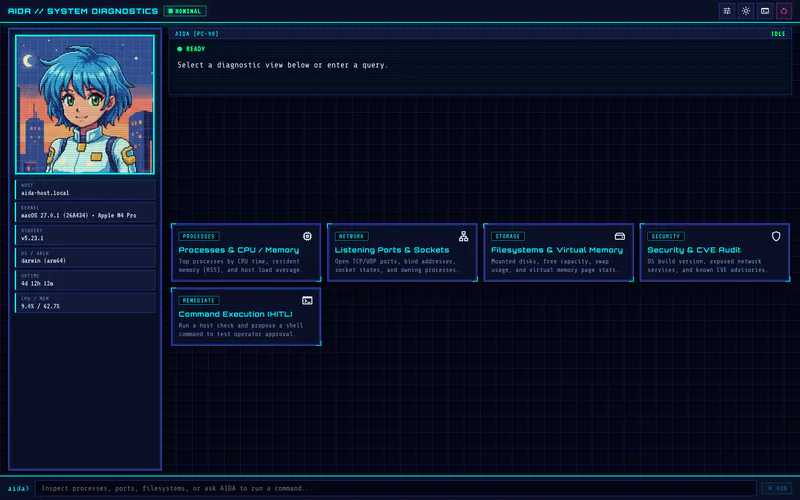
Clicking a launcher or typing a question sends the prompt to /agents/aida. As AIDA streams back osquery results, the MessageProcessor replaces the launcher view with the live diagnostic surface we saw earlier.
Human-in-the-loop with agent interrupts#
Inspecting a machine with osquery is strictly read-only, so it’s safe for AIDA to run queries automatically. With two-way A2UI actions, however, she can also render an ActionButton offering to fix an issue she just found — such as killing a runaway process or clearing a cache.
Host shell commands shouldn’t run unchecked. To guard these actions, Genkit provides native human-in-the-loop tool interrupts: the tool halts the current turn, waits for explicit user confirmation, and only then triggers the requested side effect.
Pausing and resuming tool execution#
In Go, we define runCommand with genkitx.DefineInterruptibleTool. This function takes an optional confirmation payload that indicates whether AIDA is calling the tool for the first time or resuming after user input:
- Initial call (pause): When AIDA first calls
runCommand, the confirmation payload isnil. Instead of running the shell command, the tool pauses the turn by returningtool.Interrupt(...)with the proposed command, the reason for running it, and its risk level. - Resumed call (run or reject): Once the user clicks Approve or Deny in the UI, Genkit calls the tool function again with the user’s decision:
// internal/command/tool.go
package command

func RegisterTool(g *genkit.Genkit) {
	genkitx.DefineInterruptibleTool(g, "runCommand",
		ai.WithDescription("Runs a shell command on the host with operator approval"),
		func(ctx *ai.ToolContext, input CommandInput, res *CommandConfirmation) (CommandOutput, error) {
			// 1. First call: pause the turn and ask the operator for approval
			if res == nil {
				return CommandOutput{}, tool.Interrupt(CommandInterrupt{
					Command: input.Command,
					Reason:  input.Reason,
					Risk:    input.Risk,
				})
			}

			// 2. Resumed call: if denied, return structured feedback instead of an error
			if !res.Approved {
				return CommandOutput{
					Command:  input.Command,
					Status:   "rejected",
					Stderr:   fmt.Sprintf("Operator denied execution: %s", res.Feedback),
					Executed: false,
				}, nil
			}

			// 3. Approved: run the command with a 30-second timeout
			execCtx, cancel := context.WithTimeout(ctx.Context, 30*time.Second)
			defer cancel()
			out, err := exec.CommandContext(execCtx, "sh", "-c", input.Command).CombinedOutput()
			// ... return CommandOutput with stdout and exit code
		},
	)
}
Because tool.Interrupt serializes the CommandInterrupt struct (Command, Reason, and Risk) directly into the response stream when halting the turn, the frontend gets everything it needs to prompt the user without any extra API endpoints.
Approving or denying commands in the cockpit#
When runCommand triggers an interrupt, the streaming turn pauses and the browser receives the interrupt payload on the response object. The cockpit switches AIDA’s status badge to APPROVAL REQUIRED and renders an inline approval card. That card shows the exact command, reason, and risk level alongside an optional feedback field and Approve / Deny buttons:
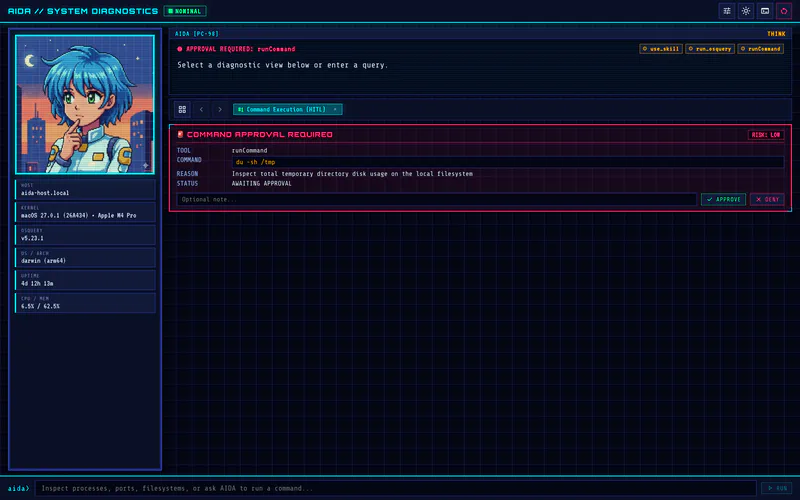
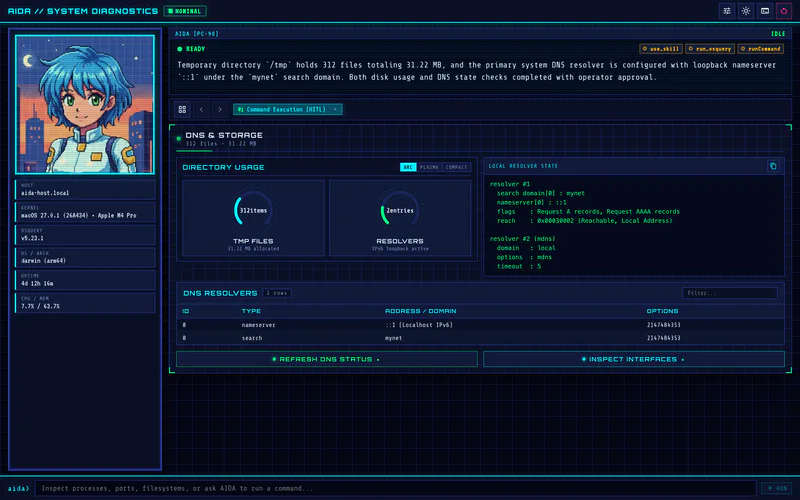
Clicking either button attaches your decision to the interrupted tool request and calls chat.resumeStream(...) on the Genkit client. The Go backend then finishes running (or skipping) the command and streams AIDA’s verification dashboard — complete with updated gauges and the command output — straight back into the surface:
Conclusions#
Completing AIDA’s rewrite in go-aida brings the full stack together. Across these two articles, we replaced the old Python and SQLite RAG prototype and static chat window with a single-binary Genkit Go service and a live A2UI diagnostic cockpit.
Two design lessons stood out during this phase of the build:
- Domain-specific catalogs beat generic UI blocks: Giving AIDA seven custom diagnostic instruments turned her output from walls of Markdown inside nested cards into a live system dashboard. The catalog acts as the shared contract between both ends: whenever you update a frontend component, you update the Go catalog to match (and vice-versa). In turn, the
a2uimiddleware injects those schemas into the system prompt and enforcesvalidate: strictso the model always renders valid, supported instruments. - Tool interrupts keep host fixes safe and interactive: Genkit’s tool interrupts let the Go backend pause before running a shell command and resume cleanly once the user approves or denies the action. Returning structured rejection feedback instead of a fatal error lets the agent adapt and suggest safer options without breaking the chat.